![Lua Eluna Icons [TrinityCore]](/uploads/products/product_24_1762890663.png)
Lua Eluna Icons [TrinityCore]
Enabling GetItemIcon Function in LUA
NON C++ Version : https://github.com/JadaDev/LuaIconsEasy
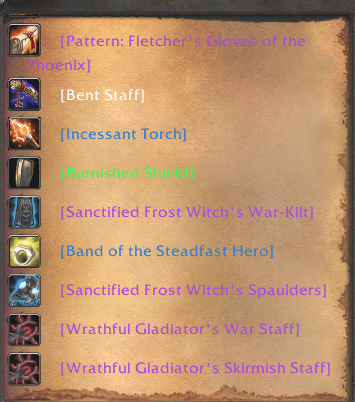
This guide explains how to add the GetItemIcon function in LUA for TrinityCore. Credits to Rocket2 & Artamedes for their assistance!
-
Open
src/server/game/LuaEngine/methods/TrinityCore/GlobalMethods.h. -
Locate "GetItemLink" and add the following code after Line 400:
int GetItemIcon(Eluna* E)
{
    uint32 entry = E->CHECKVAL(1);
    uint8 locale = E->CHECKVAL(2, DEFAULT_LOCALE);
    if (locale >= TOTAL_LOCALES)
        return luaL_argerror(E->L, 2, "valid LocaleConstant expected");

    const ItemTemplate* temp = eObjectMgr->GetItemTemplate(entry);
    std::ostringstream ss;
    ss << "|TInterface";

    const ItemDisplayInfoEntry* dispInfo = NULL;
    if (temp)
    {
        dispInfo = sItemDisplayInfoStore.LookupEntry(temp->DisplayInfoID);
        if (dispInfo)
            ss << "/ICONS/" << dispInfo->InventoryIcon[0];
    }
    if (!dispInfo)
        ss << "/InventoryItems/WoWUnknownItem01";
    E->Push(ss.str());
    return 1;
}
-
Scroll to the bottom and add the following line after Line 3271:
{ "GetItemIcon", &LuaGlobalFunctions::GetItemIcon },
-
Update Line 118 to:
DBCStorage sItemDisplayInfoStore(ItemDisplayTemplateEntryfmt);
-
Update Line 148 to:
extern DBCStorage sItemDisplayInfoStore;
-
Uncomment lines 900 to 914 to include
ItemDisplayInfoEntrystruct:struct ItemDisplayInfoEntry { uint32 ID; // 0 char const* ModelName[2]; // 1-2 char const* ModelTexture[2]; // 3-4 char const* InventoryIcon[2]; // 5-6 uint32 GeosetGroup[3]; // 7-9 uint32 Flags; // 10 uint32 SpellVisualID; // 11 uint32 GroupSoundIndex; // 12 uint32 HelmetGeosetVisID[2]; // 13-14 char const* Texture[8]; // 15-22 int32 ItemVisual; // 23 uint32 ParticleColorID; // 24 };
-
Update Line 79 to:
constexpr char ItemDisplayTemplateEntryfmt[] = "nssssssiiiiiiiissssssssii";
- Use
GetItemIcon(ItemEntry)in LUA scripts to retrieve the item icon. - Append
":30:30:-20:0|t"for proper display.
This guide provides detailed steps to integrate the GetItemIcon function into your TrinityCore server setup.
×
![]()